

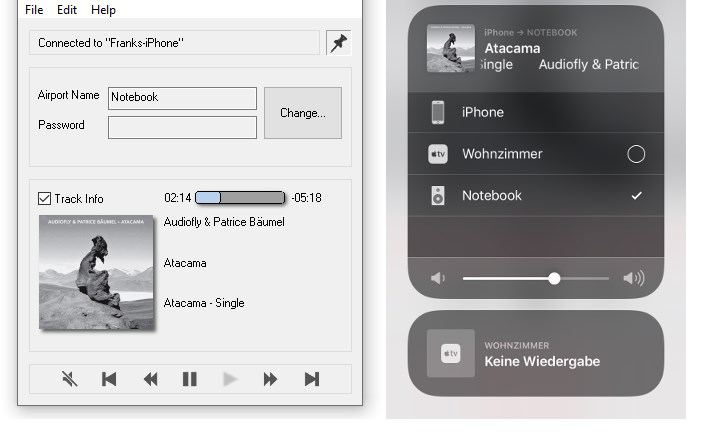

Description
Download AirConnect - Screen Mirroring & File Sharing – screen mirroring, file sharing, AirPlay, Apple devices, Windows PC, Wi-Fi streaming, multimedia, Apple TV alternative
Overview
AirConnect - Screen Mirroring & File Sharing is a utility application designed to bridge the gap between Apple devices and Windows PCs, enabling seamless multimedia streaming without the need for an Apple TV. The app functions as an AirPlay receiver, allowing users to stream videos, music, photos, and other content from iPhones, iPads, or Macs directly to their Windows machines over a shared Wi-Fi network. This capability is particularly valuable for individuals seeking a cost-effective alternative to proprietary Apple hardware, especially in environments where budget constraints or compatibility issues prevent the use of Apple TV.
The app targets users who rely on Apple devices for entertainment but prefer or require a Windows-based computing setup. This includes students, remote workers, educators, and home users who want to project presentations, share media, or enjoy streaming content on a larger screen. By leveraging existing infrastructure—specifically a common Wi-Fi network—AirConnect eliminates the need for additional hardware or complex setup procedures, offering a straightforward solution for cross-platform connectivity.
Although the developer, AirConnect, did not provide additional technical details about the app’s development background or history, the application demonstrates a clear focus on interoperability and user convenience. Its role in the broader mobile app ecosystem lies in expanding the usability of Apple’s AirPlay protocol beyond Apple’s own ecosystem, promoting accessibility and flexibility for multi-device households and workplaces. The app’s free availability further enhances its appeal as a practical tool for everyday users.
Key Features & Functionality
- Wireless Screen Mirroring via AirPlay – Users can mirror their iPhone, iPad, or Mac screen directly to a Windows PC, enabling real-time projection of content including videos, games, and live presentations.
- Audio and Video Streaming – The app supports streaming of audio and video files from native Apple apps and third-party services such as Netflix, Hulu, and YouTube, allowing users to enjoy high-quality content on a larger display.
- File Sharing Over Wi-Fi – Users can transfer photos, videos, and documents between Apple devices and Windows PCs wirelessly, streamlining content sharing without the need for cables or cloud storage.
- Network-Based Connectivity – The app operates exclusively over a shared Wi-Fi network, ensuring secure and stable connections between devices without requiring internet access.
- Compatibility with Major Streaming Platforms – AirConnect enables casting from popular streaming apps, making it a viable solution for users who want to watch content on a larger screen without switching devices.
For example, a student can mirror their iPad screen during a group presentation, projecting slides and notes directly to a Windows laptop in a classroom. Similarly, a family member can stream a movie from their iPhone to a Windows PC in the living room, transforming the computer into a personal media center. These real-world use cases highlight the app’s practicality and efficiency in everyday digital workflows.
Interface, UX & Performance
The user interface of AirConnect is designed with simplicity and functionality in mind. It features a minimalistic layout focused on essential controls, such as connection status indicators and network visibility, which helps users quickly verify that the app is active and ready to receive streams. Navigation is straightforward, with no complex menus or hidden settings, making it accessible even to users with limited technical experience.
Although the developer did not list formal performance metrics, the app is reported to maintain stable connections under typical Wi-Fi conditions. Users can expect responsive behavior when initiating a stream, with minimal latency during video playback and audio transmission. The interface remains consistent across different screen sizes and resolutions, ensuring a uniform experience on various Windows PC configurations.
Stability appears to be a core focus, as the app maintains connection integrity even during extended streaming sessions. However, the performance may vary depending on network quality and device capabilities. The developer did not specify minimum OS requirements or device compatibility beyond the Windows platform, so users are advised to ensure their system meets standard Windows requirements for network and multimedia support.
Platform Compatibility & Technical Requirements
AirConnect is available exclusively for the Windows platform, making it a targeted solution for users operating on Windows PCs. The current version is 1.0.0, with a file size of 15.8 MB, indicating a lightweight and efficient application that does not consume significant system resources.
While the app is free to download and install, users must manually install Bonjour for Windows to enable full functionality, particularly for AirPlay audio casting services. This dependency is critical for proper device discovery and connection reliability. The developer did not specify minimum OS requirements, so users should ensure their Windows system supports modern network protocols and multimedia playback.
Compatibility information was not fully disclosed, and no details were provided about supported Windows versions or hardware specifications. Users are encouraged to verify system compatibility before installation to avoid potential setup issues.
Pros and Cons
- Free to download and use, eliminating cost barriers for users
- Enables screen mirroring and file sharing between Apple devices and Windows PCs
- Supports major streaming apps like Netflix, Hulu, and YouTube
- Lightweight with minimal system resource usage
- Provides a viable Apple TV alternative for Windows users
- Requires separate installation of Bonjour for full functionality
- Not officially affiliated with Apple Inc., which may raise concerns about long-term support
- Compatibility details were not fully disclosed
- Performance may depend on network stability and device capabilities
- No in-app updates or auto-update functionality mentioned
FAQ
Is AirConnect compatible with all Apple devices?
Yes, AirConnect supports streaming from iPhone, iPad, and Mac devices that are compatible with AirPlay, provided they are connected to the same Wi-Fi network as the Windows PC.
Do I need to install anything else besides AirConnect?
Yes, to enable full AirPlay functionality, including audio casting, users must install Bonjour for Windows separately.
Can I stream content from Netflix and YouTube?
Yes, AirConnect supports streaming from popular apps like Netflix, Hulu, and YouTube, allowing users to project content to their Windows PC.
Is AirConnect safe to use?
AirConnect is a third-party application that does not collect user data. As it operates locally over Wi-Fi, it does not require internet access for basic functionality, enhancing privacy and security.
How do I update AirConnect?
Updates are managed through the download page. The developer did not specify an auto-update feature, so users must manually check for new versions.
Final Thoughts
AirConnect - Screen Mirroring & File Sharing delivers a practical, no-cost solution for users seeking to extend their Apple device experience to a Windows PC. Its ability to mirror screens, stream media, and share files wirelessly makes it a valuable tool for students, professionals, and home users alike. While it relies on an external dependency—Bonjour for Windows—the app remains stable and functional when properly configured.
For those without access to Apple TV or looking to reduce hardware costs, AirConnect offers a reliable alternative that enhances multimedia accessibility across platforms. Its lightweight design, straightforward interface, and support for major streaming services contribute to a strong value proposition.
Download AirConnect now
Guides & Tutorials for AirConnect - Screen Mirroring & File Sharing
How to install AirConnect - Screen Mirroring & File Sharing
- Click the Preview / Download button above.
- Once redirected, accept the terms and click Install.
- Wait for the AirConnect - Screen Mirroring & File Sharing download to finish on your device.
How to use AirConnect - Screen Mirroring & File Sharing
This software is primarily used for its core features described above. Open the app after installation to explore its capabilities.
User Reviews for AirConnect - Screen Mirroring & File Sharing 0
No reviews found


